一为有发反代教程,但是有点隐蔽偶然看见的,单独发一个拓展版本
一为的教程:自建 gstatic.com 的 favicon 反代服务 - 一为主题
注意:反代可以单独一个域名,也可以与主题一个域名,推荐同域名反代
下面是一些拓展功能主要是替换默认地球占位图和超时的占位图
默认的图标源获取不到会显示地球占位图,比较丑不美观

可使用下面的反代替换默认地球占位图(相比于自建图标源比较方便)效果如下

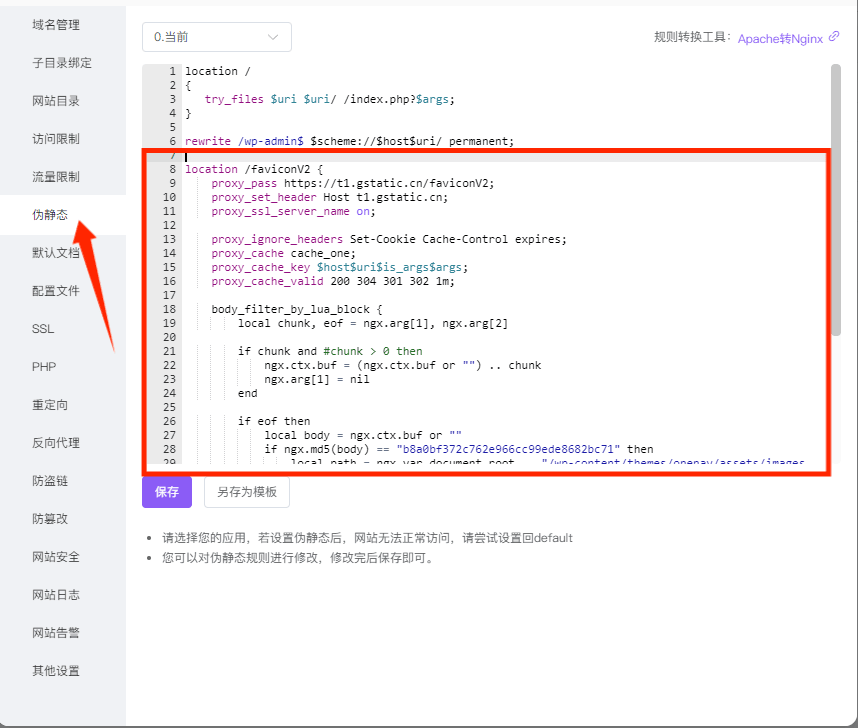
一为用户-替换反代代码为以下
location /faviconV2 {
proxy_pass https://t1.gstatic.cn/faviconV2;
proxy_set_header Host t1.gstatic.cn;
proxy_ssl_server_name on;# 超时(超时后 Nginx 会出 504/502)
proxy_connect_timeout 3s;
proxy_send_timeout 5s;
proxy_read_timeout 5s;proxy_ignore_headers Set-Cookie Cache-Control expires;
proxy_cache cache_one;
proxy_cache_key $host$uri$is_args$args;
proxy_cache_valid 200 304 301 302 1m;
proxy_cache_valid 500 502 503 504 0;# 502/503/504/500 → 直接回本地占位图(状态码改为 200,避免浏览器当错误处理)
proxy_intercept_errors on;
error_page 500 502 503 504 =200 /wp-content/themes/onenav/assets/images/favicon.png;# 可能改写响应体,先清掉 Content-Length
header_filter_by_lua_block {
ngx.header.content_length = nil
}body_filter_by_lua_block {
local chunk, eof = ngx.arg[1], ngx.arg[2]if chunk and #chunk > 0 then
ngx.ctx.buf = (ngx.ctx.buf or "") .. chunk
ngx.arg[1] = nil
endif eof then
local body = ngx.ctx.buf or ""
local globe_md5 = "b8a0bf372c762e966cc99ede8682bc71"
-- 地球占位图,或上游异常返回空内容
if body == "" or ngx.md5(body) == globe_md5 then
local path = ngx.var.document_root .. "/wp-content/themes/onenav/assets/images/favicon.png"
local f = io.open(path, "rb")
if f then
body = f:read("*a")
f:close()
ngx.header["Content-Type"] = "image/png"
ngx.header["Content-Length"] = #body
ngx.status = 200
end
end
ngx.arg[1] = body
end
}
}
STAR子主题已内置一张临时素材,使用以下反代代码

location /faviconV2 {
proxy_pass https://t1.gstatic.cn/faviconV2;
proxy_set_header Host t1.gstatic.cn;
proxy_ssl_server_name on;proxy_connect_timeout 3s;
proxy_send_timeout 5s;
proxy_read_timeout 5s;proxy_ignore_headers Set-Cookie Cache-Control expires;
proxy_cache cache_one;
proxy_cache_key $host$uri$is_args$args;
proxy_cache_valid 200 304 301 302 1m;
proxy_cache_valid 500 502 503 504 0;proxy_intercept_errors on;
error_page 500 502 503 504 =200 /wp-content/themes/onenav-star/assets/images/shixiao.webp;header_filter_by_lua_block {
ngx.header.content_length = nil
}body_filter_by_lua_block {
local chunk, eof = ngx.arg[1], ngx.arg[2]if chunk and #chunk > 0 then
ngx.ctx.buf = (ngx.ctx.buf or "") .. chunk
ngx.arg[1] = nil
endif eof then
local body = ngx.ctx.buf or ""
local globe_md5 = "b8a0bf372c762e966cc99ede8682bc71"
if body == "" or ngx.md5(body) == globe_md5 then
local path = ngx.var.document_root .. "/wp-content/themes/onenav-star/assets/images/shixiao.webp"
local f = io.open(path, "rb")
if f then
body = f:read("*a")
f:close()
ngx.header["Content-Type"] = "image/webp"
ngx.header["Content-Length"] = #body
ngx.status = 200
end
end
ngx.arg[1] = body
end
}
}
反代完成后在主题favicon 图标源内填写自己反代的链接,例如 https://你的站点/faviconV2?client=SOCIAL&type=FAVICON&fallback_opts=TYPE,SIZE,URL&size=128&url=%url%

详细版可查看 自建 favicon 反代服务+替换默认占位图 - 飞书云文档
有详细的修改教程,可自定义更换失效图片,让整体更加美观